An open-source operating system for AI software factories
Your business changes. Your software should change with it.
Build and keep improving software around the way your company works. Soda OS brings AI coding agents, shared projects and review into a software factory you control.
See plans, findings, corrections and decisions in your project’s feed. Answer a question where it matters, while the factory keeps the work moving.
Onboarding · project feedThe brief
Play this stage, or return to where you left off.
AI Product LeadFactory team · Onboarding
Direction accepted
Start with what your business needs.
An HR team asks for a better way to get new starters ready.
HR team’S REQUEST
New starters keep arriving without a laptop, a badge or a first-week plan. Build HR one place to assign the jobs and see what’s missing before day one.
Enter each starter, manager and start date
Assign checklist jobs to IT, Facilities and managers
Remind owners and share what is ready for day one
Uses the company’s existing staff sign-in.
Direction accepted
company / software3 ready · 0 / 14 merged
Explore the evidence & issue plan
Review→Fixif needed→JEV decides
↶ Review againProceed to checks →
AI Product LeadFactory team · Onboarding
Question · access rules
Who should see each assigned task?
A concrete question, in the project feed.
CLARIFY THE REQUIREMENT
Should IT and Facilities see all onboarding tasks, or just the tasks assigned to them?
HR coordinates onboarding
Task owners need a clear access rule
Why this matters
The answer belongs to the existing staff-access issue. JEV can route a comment to existing work; an answer does not automatically create another issue. The development loop continues under standing authorization.
company / software3 ready · 0 / 14 merged
Explore the evidence & issue plan
Review→Fixif needed→JEV decides
↶ Review againProceed to checks →
HR
HR teamBusiness owner · Onboarding
Answer recorded
The answer is recorded.
An illustrative owner reply. No visitor response is required.
OWNER REPLY · ILLUSTRATIVE
HR can manage onboarding. Everyone else sees only their assigned tasks. Access is for active staff only.
Reply to: Who should see each assigned task?
Recorded · awaiting incorporation
Why this matters
The answer belongs to the existing staff-access issue. JEV can route a comment to existing work; an answer does not automatically create another issue. The development loop continues under standing authorization.
company / software3 ready · 0 / 14 merged
Explore the evidence & issue plan
Review→Fixif needed→JEV decides
↶ Review againProceed to checks →
AI Product LeadFactory team · Onboarding
Answer incorporated · issue #1
The answer becomes an access rule.
The accepted requirement guides implementation and independent review.
ACCEPTED ACCESS RULE
Let HR manage onboarding while staff see the jobs assigned to them.
Active HR staff can coordinate onboarding
Active owners can see their own assigned tasks
Other owners and inactive accounts are denied
Why this matters
The answer belongs to the existing staff-access issue. JEV can route a comment to existing work; an answer does not automatically create another issue. The development loop continues under standing authorization.
Further prerequisites will be added as the remaining scope is broken down.
FORGEJO ISSUE #19
Day-one readiness
Show HR which required tasks still stand between a starter and a ready first day.
Work in this issue
Define missing required tasks
Show owners and deadlines
Test starter-specific readiness
Check readiness against completed and optional tasks
Done when
HR sees a starter’s missing required work, with its owner and deadline.
Acceptance check: Missing laptop task · HR sees IT owner and deadline
Depends on
#5 Onboarding activity log
#10 Complete assigned tasks
No prerequisites.
Further prerequisites will be added as the remaining scope is broken down.
FORGEJO ISSUE #20
Accessible checklists
Let staff complete onboarding checklists with a keyboard and understand task errors.
Work in this issue
Define task control identifiers
Wire checklist labels and errors
Test keyboard completion
Check labels and error announcements across multiple tasks
Done when
Every task control has its own label and an associated completion error.
Acceptance check: Keyboard user · completes the laptop task and hears its error if blocked
Depends on
#3 Register a new starter
#10 Complete assigned tasks
No prerequisites.
Further prerequisites will be added as the remaining scope is broken down.
FORGEJO ISSUE #21
Department task inboxes
Let IT, managers and Facilities follow their own assigned onboarding tasks.
Work in this issue
Define assigned-owner inbox scope
Show the owner’s open work
Test cross-department manager jobs
Check manager-owned jobs, HR access and overdue ordering
Done when
Staff see their own open jobs across departments; HR can coordinate all permitted tasks.
Acceptance check: Manager inbox · own jobs span departments; coworkers’ jobs stay hidden
Depends on
#4 Assign department owners
#11 Overdue work queue
No prerequisites.
Further prerequisites will be added as the remaining scope is broken down.
FORGEJO ISSUE #27
Reminder schedule
Remind owners at 09:00 office time on the working day before a task is due.
Work in this issue
Define the previous-workday reminder rule
Schedule reminders per task
Test timezones and retries
Check one reminder per task at the intended local time
Done when
Each task has one reminder at 09:00 on its previous office working day, skipping weekends.
Acceptance check: Brussels deadline · reminder arrives at 09:00 on the previous office working day
Depends on
#7 Checklist templates
#9 Generate onboarding tasks
No prerequisites.
Further prerequisites will be added as the remaining scope is broken down.
FORGEJO ISSUE #28
Send deadline reminders
Remind the current task owner about unfinished work before a starter’s deadline.
Work in this issue
Define send-time task checks
Deliver owner reminder links
Test completed tasks and retries
Check reminder delivery after completion and reassignment
Done when
Owners receive reminders linked to the task in their own inbox without repeat sends.
Acceptance check: Unfinished laptop task · current IT owner receives its reminder
Depends on
#10 Complete assigned tasks
#21 Department task inboxes
#27 Reminder schedule
No prerequisites.
Further prerequisites will be added as the remaining scope is broken down.
Built around the way your company works
Software for your department's work.
Your approval rules, terminology and exceptions belong in your software. Start with one workflow, then keep improving it as the business changes.
View CanLangBack to app↻
EquipmentRequests.canExcerpt
Approval and recorded delivery
WhencrudEquipmentby=coordinatorfields=name,category,activedelete=nonecrudRequestby=membersfields=equipment,reasonwhen=row.requested_by==actor androw.status==requesteddelete=none# Review another teammate's request against the equipment catalogue.scenarioapprove(request:Request)by=reviewerrequirerequest.status==requested andrequest.requested_by!=actorrequirerequest.equipment.activedosetrequest{status=approved,approved_by=actor,approved_at=now}# Record the physical asset when approved equipment reaches the requester.scenariodeliver(request:Request,asset_tag:text)by=coordinatorrequirerequest.status==approved andtrim(asset_tag)!=""dosetrequest{status=delivered,asset_tag=trim(asset_tag),delivered_at=now}
Equipment · App preview
Equipment
ALAlexReviewer
EQ-1042 · Avery
Standing desk
Approved
✓Alex approved14 Oct · details locked
Asset tag · 15 OctDESK-001
Delivered
Illustrative application interface · sample records.
Operations
Equipment requests
Keep catalogue selection, requests, separate approval and recorded delivery connected.
One rule. A reviewer can approve another person's request; self-approval is refused.
Next change. Add a separate Finance approval above an illustrative €1,000 threshold.
WhencrudStarterby=hrfields=name,employee,start_date,departmentdelete=nonecrudTaskby=hrfields=starter,title,responsible,due_datewhen=notrow.donedelete=none# The teammate responsible for a task records its completion.scenariocomplete(task:Task,note:text?)by=membersrequiretask.responsible==actor andnottask.donedosettask{done=true,completed_at=now,completion_note=note}# HR can hand unfinished work to another teammate.scenarioreassign(task:Task,responsible:user)by=hrrequirenottask.donedosettask{responsible}
Onboarding · App preview
Onboarding
JOJordanHR
S
Sam
Operations · Starts 8 Mar
1 / 3complete
Prepare equipmentAlex · 5 Mar · Unfinished
✓
Read safety handbookSam · 8 Mar · Completed
Welcome sessionTeam lead · 18 Mar · Unfinished
Illustrative application interface · sample records.
HR
Employee onboarding
Make each joining task's owner, deadline and completion visible.
One rule. Only the current assignee completes their unfinished task.
Next change. Align unfinished relative deadlines with the start date, protecting fixed dates and completed work.
WhencrudCostCentreby=financefields=code,name,activedelete=nonecrudExpenseby=membersfields=purpose,amount,cost_centreupdate=nonedelete=none# A reviewer approves someone else's positive expense claim.scenarioapprove(expense:Expense,note:text?)by=reviewerrequireexpense.status==submitted andexpense.submitted_by!=actorrequireexpense.cost_centre.activedosetexpense{status=approved,decision_note=note,approved_by=actor,approved_at=now}# Finance records a payment only after the claim is approved.scenariorecord_payment(expense:Expense,reference:text)by=financerequireexpense.status==approved andtrim(reference)!=""dosetexpense{status=paid,payment_reference=trim(reference),paid_at=now}
Expenses · App preview
Expenses
ALAlexReviewer
EXP-0085 · Sam
Client travel
€85
Cost centre
CLIENT
Review
Alex · Approved
External payment ref.TRAVEL-001
Paid
Payment recorded only; no money transferred.
Illustrative application interface · sample records.
Finance
Expense approvals
Give submitted expenses a clear review decision and record of external payment.
One rule. Approval belongs to a separate reviewer; submitted claim details stay protected.
Next change. Return a mistaken claim with a reason and review one linked replacement while retaining the original.
WhencrudLocationby=technicianfields=name,building,floordelete=nonecrudTicketby=membersfields=location,issue,priorityupdate=nonedelete=none# Append a visit or diagnostic note while a ticket is open.scenariorecord_work(ticket:Ticket,note:text)by=technicianrequireticket.status==open andtrim(note)!=""docreateWorkNote{parent=ticket,note=trim(note)}aswork_note# Resolve the issue with a description of the repair.scenarioresolve(ticket:Ticket,resolution:text)by=technicianrequireticket.status==open andtrim(resolution)!=""dosetticket{status=resolved,resolution=trim(resolution),resolved_by=actor,resolved_at=now}
Maintenance · App preview
Maintenance
JOJordanTechnician
MT-042 · Sam · 6 MarOpen
Air conditioning is not cooling
Jordan · Work note
Supply air is warm. Checking cooling controls.
Illustrative application interface · sample records.
Facilities
Maintenance tickets
Turn reported issues into a queue technicians can investigate and resolve.
One rule. Employees see their own reports; technicians can read the maintenance queue.
Next change. Link a new occurrence to an earlier resolved ticket at the same location, preserving both histories and access.
Choose your department. Follow its request through an accepted direction, a dependency plan, CanLang source, review and integration, then try the matching application example.
01
Define and plan
Describe the business outcome and approve the proposed direction. Soda turns it into authorized work in Forgejo, with prerequisites, access and resource limits.
02
Build
A coding agent implements the ready work in the project environment. Separate accounts and checkouts keep each attempt distinct while the Project retains its tools and services.
03
Review and correct
A separate agent session reviews the candidate alongside required automated checks. Each revised candidate needs current verification evidence; another independent review follows evidence and repository policy.
04
Merge and continue
Verified changes merge under repository policy, including human review where required. Soda reassesses dependent work and continues within the approved limits.
Required checks and repository policy govern integration, including human approval where required. Application deployment and business acceptance remain distinct.
Source-based example · Operations · Equipment requests
“Let employees request catalogue equipment. A reviewer must approve someone else’s request before Operations records delivery and an asset tag.”
An illustrative journey based on Soda OS’s documented workflow and the linked CanLang example. The request, work items and review cases are examples, not a recorded factory run.
1 / 6 · Operations owns the direction
Agree on equipment, approval and delivery.
Operations opens New Project and answers “What do you want to build?” Explore ideas develops the experience. In “Review your product direction”, Operations accepts the rules or asks for changes before implementation.
What carries forward
An accepted application direction, with people, records and refusal cases. Material questions return to Operations.
Illustrative accepted direction
Illustrative accepted direction
Avery requests a standing desk
One catalogue and a personal request list
Employees choose equipment, explain the business reason and follow their own requests. Reviewers and Operations can read the queue.
Another person approves
A reviewer approves another person’s eligible request for active equipment. Self-approval and a second approval are refused.
Operations records delivery
A coordinator records delivery only after approval, with a nonempty asset tag. Approved request details and completed delivery records stay protected.
Illustrative workflow artifact from the selected department journey.
2 / 6 · Soda coordinates the work
Give the workflow a plan with prerequisites.
Operations authorizes a finite planning allowance and chooses a repository. Soda creates native Forgejo work items with acceptance criteria and explicit dependencies. Execution needs repository authorization, accounts and capacity.
What carries forward
Accepted work-item criteria and prerequisite outcomes. Unresolved dependencies and unanswered requirements keep work from advancing.
Illustrative native work items
Illustrative native work items
From catalogue to an accountable handover
Define equipment, requests and access
Store catalogue availability, request ownership and status. Employees read their own requests; reviewers and coordinators read the queue.
Implement guarded approval and delivery
Depends on records and permissions. Check the reviewer’s identity and request state; require approval and an asset tag before delivery.
Connect screens and check outcomes
Depends on the allowed operations. Test Avery’s request, Alex’s approval and the coordinator’s delivery, alongside unrelated-reader and self-approval refusals.
Illustrative workflow artifact from the selected department journey.
3 / 6 · The coding agent implements
Build the agreed request-to-delivery rules.
Soda assesses readiness and prepares the persistent Project and assigned checkout. The coding agent implements the accepted work with repository context and authorized access, then reports a candidate and evidence. Soda OS publishes the pull request.
What carries forward
A candidate pull request at an exact revision. Spaces shows agent activity and intervention needs alongside Forgejo.
GivenrolereviewerrolecoordinatorEquipment{name:texttrimmax=120label="Equipment",category:enum(computer,furniture,accessory)label="Category",active:bool=truelabel="Available to request"}Request{equipment:Equipmentlabel="Equipment",reason:texttrimmax=500label="Business reason",requested_by:userserver=actorlabel="Requested by",status:enum(requested,approved,delivered)=requestedlabel="Status",approved_by:user?label="Approved by",approved_at:datetime?label="Approved at",delivered_at:datetime?label="Delivered at",asset_tag:text?label="Asset tag"}policyEquipmentread=memberspolicyRequestread=memberswhere=row.requested_by==actorpolicyRequestread=reviewerpolicyRequestread=coordinatorinvariantRequest:trim(row.reason)!=""lockRequestfields=equipment,reason,requested_bywhen=row.status!=requestedlockRequestfields=approved_by,approved_atwhen=row.status!=requestedlockRequestfields=status,delivered_at,asset_tagwhen=row.status==deliveredWhencrudEquipmentby=coordinatorfields=name,category,activedelete=nonecrudRequestby=membersfields=equipment,reasonwhen=row.requested_by==actor androw.status==requesteddelete=none# Review another teammate's request against the equipment catalogue.scenarioapprove(request:Request)by=reviewerrequirerequest.status==requested andrequest.requested_by!=actorrequirerequest.equipment.activedosetrequest{status=approved,approved_by=actor,approved_at=now}# Record the physical asset when approved equipment reaches the requester.scenariodeliver(request:Request,asset_tag:text)by=coordinatorrequirerequest.status==approved andtrim(asset_tag)!=""dosetrequest{status=delivered,asset_tag=trim(asset_tag),delivered_at=now}
4 / 6 · Another agent checks the candidate
Check identity as well as the reviewer role.
A separate agent session reviews the exact candidate alongside required checks. Findings return to the coding role; revised candidates receive fresh checks, with further independent review when evidence or repository policy requires it.
What carries forward
Evidence belongs to the revised candidate. These are illustrative review expectations, rather than a report of a completed factory run.
Illustrative review and correction
Illustrative review and correction
A reviewer must not approve their own request
Finding: a role check would allow self-approval
If Avery also held the reviewer role, checking that role alone would permit Avery to approve the standing desk request.
Correction: check identity, state and availability
Require an awaiting request from another person and active catalogue equipment. Delivery separately requires approval and a valid asset tag.
Fresh review: exercise permitted and refused paths
Alex can approve Avery’s request; Avery cannot approve it. Refuse repeated approval, delivery before approval and changes to approved or delivered details. An unrelated employee cannot read Avery’s request.
Illustrative workflow artifact from the selected department journey.
5 / 6 · Forgejo policy governs integration
Integrate when current evidence satisfies policy.
Soda merges when required checks and review pass for the exact candidate and repository policy permits it. Required human approval is part of that path. Changed or missing evidence prevents integration.
What carries forward
Confirmed integration lets Soda reassess dependent work. Application deployment remains a separate action.
Integration conditions
Integration conditions
The revision, evidence and native outcome agree
The candidate still matches
The pull request’s current revision is the revision that was checked and reviewed.
Required evidence is current
Checks, review and any required human approval satisfy the repository’s policy.
Forgejo confirms integration
The native merge and work-item outcome are recorded before dependent work is reassessed.
Illustrative workflow artifact from the selected department journey.
6 / 6 · Operations and employees assess the result
Follow Avery’s request through the handover.
Employees and Operations assess the agreed workflow: Avery requests a standing desk, Alex approves it and a coordinator records delivery. The larger CanLang source covers that first version. The compact browser example lets you try request and approval rules.
What carries forward
A workflow assessed against the department’s acceptance outcomes. The next agreed improvement enters the same persistent Project.
WhencrudEquipmentby=coordinatorfields=name,category,activedelete=nonecrudRequestby=membersfields=equipment,reasonwhen=row.requested_by==actor androw.status==requesteddelete=none# Review another teammate's request against the equipment catalogue.scenarioapprove(request:Request)by=reviewerrequirerequest.status==requested andrequest.requested_by!=actorrequirerequest.equipment.activedosetrequest{status=approved,approved_by=actor,approved_at=now}# Record the physical asset when approved equipment reaches the requester.scenariodeliver(request:Request,asset_tag:text)by=coordinatorrequirerequest.status==approved andtrim(asset_tag)!=""dosetrequest{status=delivered,asset_tag=trim(asset_tag),delivered_at=now}
Equipment · App preview
Equipment
ALAlexReviewer
EQ-1042 · Avery
Standing desk
Approved
✓Alex approved14 Oct · details locked
Asset tag · 15 OctDESK-001
Delivered
Illustrative application interface · sample records.
Read the application outcomes
Requested → Approved → Delivered
Avery follows a personal request
Choose catalogue equipment and explain the reason. Ordinary employees cannot read another person’s requests.
Alex approves; Operations records delivery
Approval protects the request details. A nonempty asset tag records the handover, with completed delivery fields preserved.
The next requirement stays with this app
Operations can later add Finance approval above €1,000 through a separately reviewed change. That continuation has its own supporting source; it does not extend the compact demo.
Source-based example · HR · Onboarding tasks
“Give every onboarding task an owner. HR needs the full list; teammates need their own tasks and a way to complete them.”
An illustrative journey based on Soda OS’s documented workflow and the linked CanLang example. The request, work items and review cases are examples, not a recorded factory run.
1 / 6 · HR owns the direction
Agree on what good onboarding looks like.
Open New Project and answer “What do you want to build?” Explore ideas turns the request into a direction. HR uses “Review your product direction” to accept the experience or ask for changes.
What carries forward
An accepted product direction. Material questions return to HR instead of becoming hidden assumptions.
Example accepted direction
Example accepted direction
Onboarding tasks, with clear ownership
HR assigns and follows work
Create tasks, choose a responsible teammate and see the full list.
Teammates see their own tasks
Only the assigned person can complete a task.
Completed tasks keep their history
Lock the title and owner after completion. Keep deletion unavailable.
Illustrative workflow artifact from the selected department journey.
2 / 6 · Soda coordinates the work
Turn the direction into work with prerequisites.
Authorize a finite planning allowance and choose a repository. Soda generates native Forgejo work items with acceptance criteria and explicit dependencies. Execution still needs the repository’s authorization, accounts and capacity.
What carries forward
Accepted issue criteria and prerequisite outcomes. Work waits for unresolved dependencies or unanswered requirements.
Example native work items
Example native work items
A dependency plan for the same request
Define the Task record and access
Store title, responsible person and completion state. HR reads all tasks; teammates read their own.
Implement assignment and completion
Depends on the record and access rules. HR edits unfinished tasks; only the assignee completes.
Connect the form and task list
Depends on the record and operations. Verify the accepted behavior for HR and teammates.
Illustrative workflow artifact from the selected department journey.
3 / 6 · The coding agent implements
Build against the accepted rules.
Soda assesses readiness and prepares the repository’s persistent Project and assigned coding checkout. The selected coding agent receives the accepted issue, repository context and authorized account access, then reports the candidate and evidence. Soda OS publishes the pull request.
What carries forward
A candidate pull request at an exact revision. Spaces makes live agent activity and intervention needs visible alongside Forgejo.
Onboarding.can · source excerpt
The task’s completion rule
GivenrolehrTask{title:texttrim,responsible:user,done:bool=false}policyTaskread=memberswhere=row.responsible==actorpolicyTaskread=hrlockTaskfields=title,responsiblewhen=row.doneWhencrudTaskby=hrfields=title,responsiblewhen=notrow.donedelete=none# Mark your assigned onboarding task complete.scenariocomplete(task:Task)by=membersrequiretask.responsible==actor andnottask.donedosettask{done=true}
4 / 6 · Another agent checks the candidate
Check the behavior, then correct and review again.
A separate agent session reviews the exact candidate alongside required checks. Findings return to the coding role; revised candidates receive fresh checks, with further independent review when evidence or repository policy requires it.
What carries forward
Findings and review evidence tied to the candidate revision. An agent saying “done” does not establish a completed change.
Illustrative review and correction
Illustrative review and correction
Membership alone must not allow completion
Finding: membership would be too broad
If a candidate checked only membership, Alex could complete Sam’s task. That would violate HR’s accepted requirement.
Correction: check assignment and status
The coding role adds the responsible-person check and requires the task to be unfinished, as in the source above.
Fresh review: test all three outcomes
Sam can complete Sam’s unfinished task; Alex is refused; HR cannot change a completed task’s title or owner. Verify these expectations on the revised candidate.
Illustrative workflow artifact from the selected department journey.
5 / 6 · Forgejo policy governs integration
Integrate when the current policy permits it.
Soda merges automatically when required review and checks pass for the exact candidate and repository policy permits it. If policy requires human approval, that approval is part of the path. Changed or missing evidence prevents integration.
What carries forward
Confirmed integration lets Soda reassess dependent work. Merge and application deployment remain separate actions.
Integration conditions
Integration conditions
The candidate must satisfy all three
The revision still matches
The pull request’s current candidate is the revision that was checked and reviewed.
Required evidence is current
The required checks, review and any required human approval satisfy the repository’s rules.
Native merge is confirmed
Forgejo records the integration and corresponding issue outcome. Creating a PR is not a merge.
Illustrative workflow artifact from the selected department journey.
6 / 6 · HR and teammates use the workflow
One app connects assignment and progress.
The same CanLang source describes the records, access rules, completion action and screen. Try the matching browser example: assign a task as HR, switch to its responsible teammate and complete it.
What carries forward
A tool shaped around the department’s work. The next accepted improvement enters the same factory process.
WhencrudStarterby=hrfields=name,employee,start_date,departmentdelete=nonecrudTaskby=hrfields=starter,title,responsible,due_datewhen=notrow.donedelete=none# The teammate responsible for a task records its completion.scenariocomplete(task:Task,note:text?)by=membersrequiretask.responsible==actor andnottask.donedosettask{done=true,completed_at=now,completion_note=note}# HR can hand unfinished work to another teammate.scenarioreassign(task:Task,responsible:user)by=hrrequirenottask.donedosettask{responsible}
Onboarding · App preview
Onboarding
JOJordanHR
S
Sam
Operations · Starts 8 Mar
1 / 3complete
Prepare equipmentAlex · 5 Mar · Unfinished
✓
Read safety handbookSam · 8 Mar · Completed
Welcome sessionTeam lead · 18 Mar · Unfinished
Illustrative application interface · sample records.
Read the application outcomes
Read the safety handbook → Sam → Complete
HR has the overview
Assign work and update unfinished tasks from the same list.
Sam has a clear next action
See assigned tasks and mark them complete. Alex cannot complete Sam’s work.
The rule stays with the record
Completed titles and owners stay locked. The browser example mirrors these rules with local page state.
Source-based example · Finance · Expense approvals
“Let teammates submit expenses with a purpose and amount. Reviewers need a shared approval list, and nobody should approve their own claim.”
An illustrative journey based on Soda OS’s documented workflow and the linked CanLang example. The request, work items and review cases are examples, not a recorded factory run.
1 / 6 · Finance owns the direction
Agree on a clear expense approval process.
Finance opens New Project and answers “What do you want to build?” Explore ideas develops the request: Sam submits Client travel for EUR 85.00; a separate reviewer approves it. Finance accepts or changes the experience in “Review your product direction”.
What carries forward
An accepted expense workflow. Material questions return to Finance instead of becoming hidden assumptions.
Example accepted direction
Example accepted direction
Expense claims, with separate approval
Capture the claim accurately
Store purpose, exact money amount, submitter and status. Require a positive amount; employees read their own claims and reviewers read the review queue.
Keep approval independent
Only a reviewer approves a submitted claim. Block self-approval even when the submitter also has the reviewer role.
Preserve the approved claim
Block repeated approval and lock purpose, amount and submitter after approval. Keep claim updates and deletion unavailable.
Illustrative workflow artifact from the selected department journey.
2 / 6 · Soda coordinates the work
Give each approval requirement a prerequisite.
Authorize a finite planning allowance and choose a repository. Soda creates native Forgejo work items with acceptance criteria and explicit dependencies. Execution needs the repository’s authorization, accounts and capacity.
What carries forward
Accepted issue criteria and prerequisite outcomes. Unresolved dependencies or unanswered requirements interrupt the work.
Example native work items
Example native work items
A dependency plan for Sam’s claim
Define the Expense record and access
Store exact money and the submitting actor. Require positive amounts, employee access to own claims and reviewer access to the queue.
Implement submission and approval
Depends on the record and access rules. Accept submissions; require reviewer role, submitted status and a different submitter before approval.
Connect the claim form and review list
Depends on records and operations. Check EUR 85.00 stays exact, another reviewer can approve, and self-approval and repeated approval are refused.
Illustrative workflow artifact from the selected department journey.
3 / 6 · The coding agent implements
Keep the expense policy with the claim.
Soda assesses readiness and prepares the repository’s persistent Project and assigned coding checkout. The selected coding agent receives the accepted issue, repository context and authorized account access, then reports the candidate and evidence. Soda OS publishes the pull request.
What carries forward
A candidate pull request at an exact revision. Spaces shows live agent activity and intervention needs alongside Forgejo.
Expenses.can · source excerpt
Positive amounts and independent approval
GivenrolereviewerExpense{purpose:texttrim,amount:money,submitted_by:userserver=actor,status:enum(submitted,approved)=submitted}policyExpenseread=memberswhere=row.submitted_by==actorpolicyExpenseread=reviewerinvariantExpense:row.amount.minor>0lockExpensefields=purpose,amount,submitted_bywhen=row.status==approvedWhencrudExpenseby=membersfields=purpose,amountupdate=nonedelete=none# Approve a submitted expense from another teammate.scenarioapprove(expense:Expense)by=reviewerrequireexpense.status==submitted andexpense.submitted_by!=actordosetexpense{status=approved}
4 / 6 · Another agent checks the candidate
Catch self-approval, then review the correction.
A separate agent session reviews the exact candidate alongside required checks. Findings return to the coding role; revised candidates receive fresh checks, with further independent review when evidence or repository policy requires it.
What carries forward
Findings and evidence belong to the revised candidate. These cases illustrate review expectations rather than report a completed run.
Illustrative review and correction
Illustrative review and correction
A reviewer role alone is insufficient
Finding: Sam could approve Sam’s claim
If a candidate checked only the reviewer role, Sam could approve their own EUR 85.00 expense. That violates Finance’s accepted requirement.
Correction: require a different submitter
The coding role checks submitted status and submitter identity, alongside reviewer authority and the positive-amount invariant shown above.
Fresh review: exercise the accepted cases
Alex as reviewer can approve Sam’s submitted claim; Sam as reviewer cannot. Refuse ordinary employee approval, repeat approval, zero and negative amounts. Preserve EUR 85.00 exactly and lock approved fields.
Illustrative workflow artifact from the selected department journey.
5 / 6 · Forgejo policy governs integration
Integrate when the current policy permits it.
Soda merges automatically when required review and checks pass for the exact candidate and repository policy permits it. When policy requires human approval, that approval is part of the path. Changed or missing evidence prevents integration.
What carries forward
Confirmed integration lets Soda reassess dependent work. Merge and application deployment remain separate actions.
Integration conditions
Integration conditions
The candidate must satisfy all three
The revision still matches
The pull request’s current candidate is the revision that was checked and reviewed.
Required evidence is current
Required checks, review and any required human approval satisfy the repository’s rules.
Native merge is confirmed
Forgejo records integration and the corresponding issue outcome. A published pull request alone does not establish integration.
Illustrative workflow artifact from the selected department journey.
6 / 6 · Finance and employees use the workflow
Connect expense submission and independent review.
The same CanLang source describes the claim, access rules, approval action and screen. Try the matching browser example: submit Client travel as Sam, then switch to Alex as reviewer to approve EUR 85.00.
What carries forward
A tool shaped around Finance’s work. The next accepted improvement enters the same factory process.
WhencrudCostCentreby=financefields=code,name,activedelete=nonecrudExpenseby=membersfields=purpose,amount,cost_centreupdate=nonedelete=none# A reviewer approves someone else's positive expense claim.scenarioapprove(expense:Expense,note:text?)by=reviewerrequireexpense.status==submitted andexpense.submitted_by!=actorrequireexpense.cost_centre.activedosetexpense{status=approved,decision_note=note,approved_by=actor,approved_at=now}# Finance records a payment only after the claim is approved.scenariorecord_payment(expense:Expense,reference:text)by=financerequireexpense.status==approved andtrim(reference)!=""dosetexpense{status=paid,payment_reference=trim(reference),paid_at=now}
Expenses · App preview
Expenses
ALAlexReviewer
EXP-0085 · Sam
Client travel
€85
Cost centre
CLIENT
Review
Alex · Approved
External payment ref.TRAVEL-001
Paid
Payment recorded only; no money transferred.
Illustrative application interface · sample records.
Read the application outcomes
Client travel → EUR 85.00 → Approved
Sam sees Sam’s claims
Submit a positive exact money amount and follow its status in the personal list.
Alex reviews the queue
Approve another employee’s submitted claim. Reviewer authority never permits self-approval.
Approval preserves the details
Repeated approval is refused and approved fields stay locked. The browser example mirrors the rules with local page state and a reset control.
Source-based example · Facilities · Maintenance tickets
“Let teammates report maintenance issues with a location. Technicians need a shared queue and a way to mark open tickets resolved.”
An illustrative journey based on Soda OS’s documented workflow and the linked CanLang example. The request, work items and review cases are examples, not a recorded factory run.
1 / 6 · Facilities owns the direction
Agree on a clear path from report to resolution.
Facilities opens New Project and answers “What do you want to build?” Explore ideas develops the request: Sam reports that Floor 2’s air conditioning is not cooling; a technician resolves the ticket. Facilities accepts or changes the experience in “Review your product direction”.
What carries forward
An accepted maintenance workflow. Material questions return to Facilities instead of becoming hidden assumptions.
Example accepted direction
Example accepted direction
Maintenance reports, with a technician queue
Capture a useful report
Keep location, issue, reporter and status together. New reports start open and record the employee who submitted them.
Give each role the right view
Employees read their own reports. Technicians read the full maintenance queue.
Let technicians resolve open tickets
Require the technician role and open status. Block repeated resolution, lock resolved details and keep ticket updates and deletion unavailable.
Illustrative workflow artifact from the selected department journey.
2 / 6 · Soda coordinates the work
Plan the report, queue and resolution in order.
Authorize a finite planning allowance and choose a repository. Soda creates native Forgejo work items with acceptance criteria and explicit dependencies. Execution needs the repository’s authorization, accounts and capacity.
What carries forward
Accepted issue criteria and prerequisite outcomes. Unresolved dependencies or unanswered requirements interrupt the work.
Example native work items
Example native work items
A dependency plan for the Floor 2 report
Define the Ticket record and access
Store location, issue, reporting actor and open status. Employees read their own reports; technicians read the full queue.
Implement reporting and resolution
Depends on the record and access rules. Accept reports; require technician authority and open status before resolving a ticket.
Connect the reporting form and queue
Depends on records and operations. Verify Sam’s own-ticket view, the technician’s full queue and refusal of employee or repeated resolution.
Illustrative workflow artifact from the selected department journey.
3 / 6 · The coding agent implements
Make resolution follow the ticket’s rules.
Soda assesses readiness and prepares the repository’s persistent Project and assigned coding checkout. The selected coding agent receives the accepted issue, repository context and authorized account access, then reports the candidate and evidence. Soda OS publishes the pull request.
What carries forward
A candidate pull request at an exact revision. Spaces shows live agent activity and intervention needs alongside Forgejo.
Maintenance.can · source excerpt
Own reports, shared queue and guarded resolution
GivenroletechnicianTicket{location:texttrim,issue:texttrim,reported_by:userserver=actor,status:enum(open,resolved)=open}policyTicketread=memberswhere=row.reported_by==actorpolicyTicketread=technicianlockTicketfields=location,issue,reported_bywhen=row.status==resolvedWhencrudTicketby=membersfields=location,issueupdate=nonedelete=none# Resolve an open maintenance ticket.scenarioresolve(ticket:Ticket)by=technicianrequireticket.status==opendosetticket{status=resolved}
4 / 6 · Another agent checks the candidate
Check who can resolve, and when.
A separate agent session reviews the exact candidate alongside required checks. Findings return to the coding role; revised candidates receive fresh checks, with further independent review when evidence or repository policy requires it.
What carries forward
Findings and evidence belong to the revised candidate. These cases illustrate review expectations rather than report a completed run.
Illustrative review and correction
Illustrative review and correction
Reporting an issue does not authorize resolution
Finding: an employee could resolve a report
If a candidate allowed any member to resolve a ticket, Sam could close the Floor 2 report without technician authority. That violates Facilities’ accepted requirement.
Correction: guard the role and state
The coding role restricts resolution to technicians and requires an open ticket, as in the source above.
Fresh review: exercise the accepted cases
A technician can resolve Sam’s open report; Sam as employee cannot. Refuse a second resolution and changes to resolved details. Verify employees see their own reports while technicians see the full queue.
Illustrative workflow artifact from the selected department journey.
5 / 6 · Forgejo policy governs integration
Integrate when the current policy permits it.
Soda merges automatically when required review and checks pass for the exact candidate and repository policy permits it. When policy requires human approval, that approval is part of the path. Changed or missing evidence prevents integration.
What carries forward
Confirmed integration lets Soda reassess dependent work. Merge and application deployment remain separate actions.
Integration conditions
Integration conditions
The candidate must satisfy all three
The revision still matches
The pull request’s current candidate is the revision that was checked and reviewed.
Required evidence is current
Required checks, review and any required human approval satisfy the repository’s rules.
Native merge is confirmed
Forgejo records integration and the corresponding issue outcome. A published pull request alone does not establish integration.
Illustrative workflow artifact from the selected department journey.
6 / 6 · Facilities and employees use the workflow
Turn Sam’s report into a resolved ticket.
The same CanLang source describes the ticket, access rules, resolution action and screen. Try the matching browser example: report Floor 2’s air conditioning issue as Sam, then switch to the technician to resolve it.
What carries forward
A tool shaped around Facilities’ work. The next accepted improvement enters the same factory process.
WhencrudLocationby=technicianfields=name,building,floordelete=nonecrudTicketby=membersfields=location,issue,priorityupdate=nonedelete=none# Append a visit or diagnostic note while a ticket is open.scenariorecord_work(ticket:Ticket,note:text)by=technicianrequireticket.status==open andtrim(note)!=""docreateWorkNote{parent=ticket,note=trim(note)}aswork_note# Resolve the issue with a description of the repair.scenarioresolve(ticket:Ticket,resolution:text)by=technicianrequireticket.status==open andtrim(resolution)!=""dosetticket{status=resolved,resolution=trim(resolution),resolved_by=actor,resolved_at=now}
Maintenance · App preview
Maintenance
JOJordanTechnician
MT-042 · Sam · 6 MarOpen
Air conditioning is not cooling
Jordan · Work note
Supply air is warm. Checking cooling controls.
Illustrative application interface · sample records.
Read the application outcomes
Floor 2 → Air conditioning not cooling → Resolved
Sam follows Sam’s reports
Record a location and issue, then see the report’s status in the personal list.
The technician follows the full queue
See every reported issue and resolve open tickets through the same workflow.
Resolution preserves the report
Employees cannot resolve tickets; repeat resolution is refused. The browser example mirrors the rules with local page state and a reset control.
The factory sequence and interface names follow the product documents and source code. Application behavior follows the matching complete examples on the CanLang page.
The equipment workflow is useful. Now the company asks for Finance approval above €1,000 before delivery. Agree the rule, develop a reviewed change, and check both the new path and what must remain protected.
View CanLangBack to app↻
EquipmentRequestsFinance.canRule-change excerpt
Independent Finance approval above €1,000
WhencrudEquipmentby=coordinatorfields=name,category,activedelete=nonecrudRequestby=membersfields=equipment,reason,amountwhen=row.requested_by==actor androw.status==requesteddelete=none# Review another teammate's request against the equipment catalogue.scenarioapprove(request:Request)by=reviewerrequirerequest.status==requested andrequest.requested_by!=actorrequirerequest.equipment.activedo ifrequest.policy==finance_threshold andrequest.amount!=null andrequest.amount.minor>100000setrequest{status=awaiting_finance,approved_by=actor,approved_at=now} elsesetrequest{status=approved,approved_by=actor,approved_at=now}examplesrequest=pendingas,request.amount,request.policy->request.statusfirst_reviewer,money(450,"EUR"),finance_threshold->approvedfirst_reviewer,money(1000,"EUR"),finance_threshold->approvedfirst_reviewer,money(1400,"EUR"),finance_threshold->awaiting_financefirst_reviewer,money(1400,"EUR"),original->approvedfirst_reviewer,null,original->approvedmembers,money(450,"EUR"),finance_threshold->error(forbidden)examplesrequest=pendingas,request.requested_by,request.status->request.statusfirst_reviewer,first_reviewer,requested->error(rule_failed)first_reviewer,claimant,approved->error(rule_failed)# Finance must be a third person, even when one person has multiple roles.scenarioapprove_finance(request:Request)by=financerequirerequest.status==awaiting_finance andrequest.policy==finance_thresholdrequirerequest.requested_by!=actor andrequest.approved_by!=actordosetrequest{status=approved,finance_by=actor,finance_at=now}examplesrequest=pendingas,request.status,request.amount,request.approved_by->request.status,request.finance_byfinance_reviewer,awaiting_finance,money(1400,"EUR"),first_reviewer->approved,finance_reviewerfirst_reviewer,awaiting_finance,money(1400,"EUR"),first_reviewer->error(rule_failed)claimant,awaiting_finance,money(1400,"EUR"),first_reviewer->error(rule_failed)finance_reviewer,approved,money(1400,"EUR"),first_reviewer->error(rule_failed)# Record the physical asset when approved equipment reaches the requester.scenariodeliver(request:Request,asset_tag:text)by=coordinatorrequirerequest.status==approved andtrim(asset_tag)!=""dosetrequest{status=delivered,asset_tag=trim(asset_tag),delivered_at=now}examplesrequest=pendingas,request.status,asset_tag->request.status,request.asset_tagcoordinator,approved,"DESK-104"->delivered,"DESK-104"coordinator,awaiting_finance,"DESK-104"->error(rule_failed)coordinator,approved," "->error(rule_failed)members,approved,"DESK-104"->error(forbidden)coordinator,delivered,"DESK-104"->error(rule_failed)
Equipment · After a rule change
Equipment
MOMorganFinance
Workspace/Requests Internal app
Equipment register
Finance review
1 awaiting Finance
EQ-1048 · Catalogue
Standing desk
Avery ·Active item
Approval policy
Finance review above €1,000
✓
Alex approved · 14 Oct, 10:24€1,400 · amount locked after review
Awaiting FinanceMorgan · Finance
Decision not yet recorded. Morgan is different from Avery and Alex.
Delivery blockedFinance approval required before handover.
Review history & delivery requirements
Avery requested a standing desk14 Oct, 09:05 · equipment and business reason recorded
Alex approved €1,40014 Oct, 10:24 · approved details protected
Finance review pendingNo Finance decision or delivery recorded. A nonempty asset tag is required after approval.
Policy applied to this request
€1,000 or less
Independent reviewer approval, then delivery.
Above €1,000
Reviewer approval, then a third person in Finance, then delivery.
Earlier requests
Earlier requests retain their original policy, including while pending. Their records and decisions remain unchanged.
Requester, reviewer and Finance approver must be different people. A recorded decision cannot be repeated.
Illustrative application interface · sample records.
Explore the approval paths and protected requestsIllustrative company policy · new requests
One amount. Two approval paths.
EmployeeRequest equipmentPositive total in EUR
Ordinary reviewerApprove another person's requestReviewed amount is now locked
€450 or exactly €1,000€1,000 or less
Ordinary approval is enough
For example, €1,400Above €1,000
Awaiting FinanceA third person approves
Delivery refused until Finance approves.
Operations records deliveryRequired approvals + nonempty asset tag
Earlier requests keep their original route. Pending and completed requests retain their previous workflow, records and decisions. Each request shows which policy applies.
Requester, initial approver and Finance approver must be three different people—even when one person holds multiple roles. Repeated decisions are refused.
01 Initial rule
A separate reviewer approves the request before Operations records delivery.
02 New rule
For new requests above €1,000, ordinary approval leads to Awaiting Finance. A separate Finance approval is required before delivery. Exactly €1,000 follows the ordinary path.
What stays protected
The requester, initial approver and Finance approver are different people. Reviewed amounts and decisions stay fixed. Earlier requests, including pending ones, keep their original workflow and records.
A lasting development home
The persistent Project keeps tools, shared files, accounts and development services ready for the next request. Forgejo retains source and software history; application records have their own storage and operating responsibilities.
Visibility, intervention and review
Spaces shows progress, blockers and live activity beside Forgejo collaboration. People can address questions or intervene with familiar tools. Current checks, review evidence and repository policy govern integration.
Illustrative company policy, applied to new requests. Earlier requests, including pending ones, keep their original workflow.
CanLang is an implicit behavior language built to cover 80% of standard business use cases. Express your records, permissions and workflow rules; shared defaults supply the familiar behavior. Use it independently or alongside Soda OS.
Soda OS coordinates development. CanLang provides foundations for business applications. Its 80% business-use-case scope is a product design scope. Use CanLang independently or choose other application code within Soda OS.
WhencrudEquipmentby=coordinatorfields=name,category,activedelete=nonecrudRequestby=membersfields=equipment,reasonwhen=row.requested_by==actor androw.status==requesteddelete=none# Review another teammate's request against the equipment catalogue.scenarioapprove(request:Request)by=reviewerrequirerequest.status==requested andrequest.requested_by!=actorrequirerequest.equipment.activedosetrequest{status=approved,approved_by=actor,approved_at=now}# Record the physical asset when approved equipment reaches the requester.scenariodeliver(request:Request,asset_tag:text)by=coordinatorrequirerequest.status==approved andtrim(asset_tag)!=""dosetrequest{status=delivered,asset_tag=trim(asset_tag),delivered_at=now}
Equipment · App preview
Equipment
ALAlexReviewer
EQ-1042 · Avery
Standing desk
Approved
✓Alex approved14 Oct · details locked
Asset tag · 15 OctDESK-001
Delivered
Illustrative application interface · sample records.
How the application foundations connectIllustrative equipment application · Shared foundations
RequestTyped record
Item
Standing desk
Requested by
Avery
Status
Requested
Team memberReads their own requests
ReviewerReads requests for review
Explicit workflow ruleApprove another person’s requestApproved
Connected interface
Request formRequest list
Forms and lists use the same records and rules.
Typed data + validation · People + access · Operations · Interfaces
A factory on infrastructure you control
Run the factory on infrastructure you control.
Install your company’s factory on a compatible x86_64 server, workstation or gaming PC. The same ISO also boots an x86_64 virtual machine on a compatible host.
Company operating model
Your team’s request. A factory to carry it forward.Equipment requests · one company workflow
OperationsWorkflow owner
The department brief
Equipment requests
“Request equipment, approve it separately, and record delivery.”
Separate requester and approver
Keep the delivery asset tag
Agreed direction
equipment-requestsPersistent Project
Shared development home
SodaCoordinates
Issue #42Candidate ready
Record equipment handover
Require a delivery asset tag.
Authorised coding agent
ForgejoReviews + policy
Pull request #24Review requested
Add the delivery record
Review and checks apply to the same revision.
Required checks
Passed
Independent review
Requested
Merge
Waiting for policy
The team tries the result, accepts it and requests the next change.
Your operatorMaintains the shared foundation
Infrastructure
Accounts + access
Execution policy
Updates + recovery
Illustrative records. Departments own acceptance; deployment is separate from merge.
Departments define success. IT operates the foundation.
Departments own business requirements and acceptance. Platform administrators manage private-network infrastructure, access, accounts, execution policies, updates and recovery.
Soda coordinates. Developers can intervene.
Soda coordinates authorised work; Forgejo owns repositories, native collaboration and integration policy. Developers keep their computers, editors and terminals and can work over SSH in separate human checkouts.
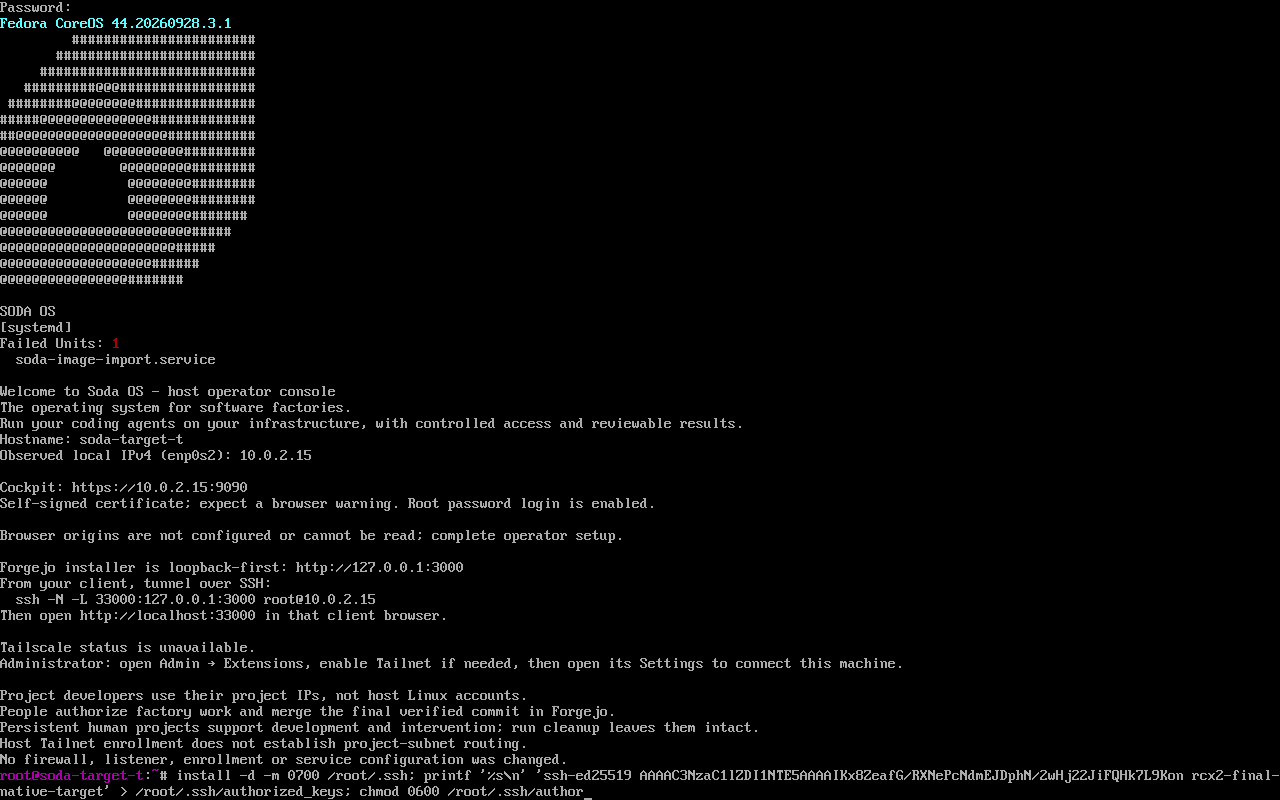
Host console1 / 5
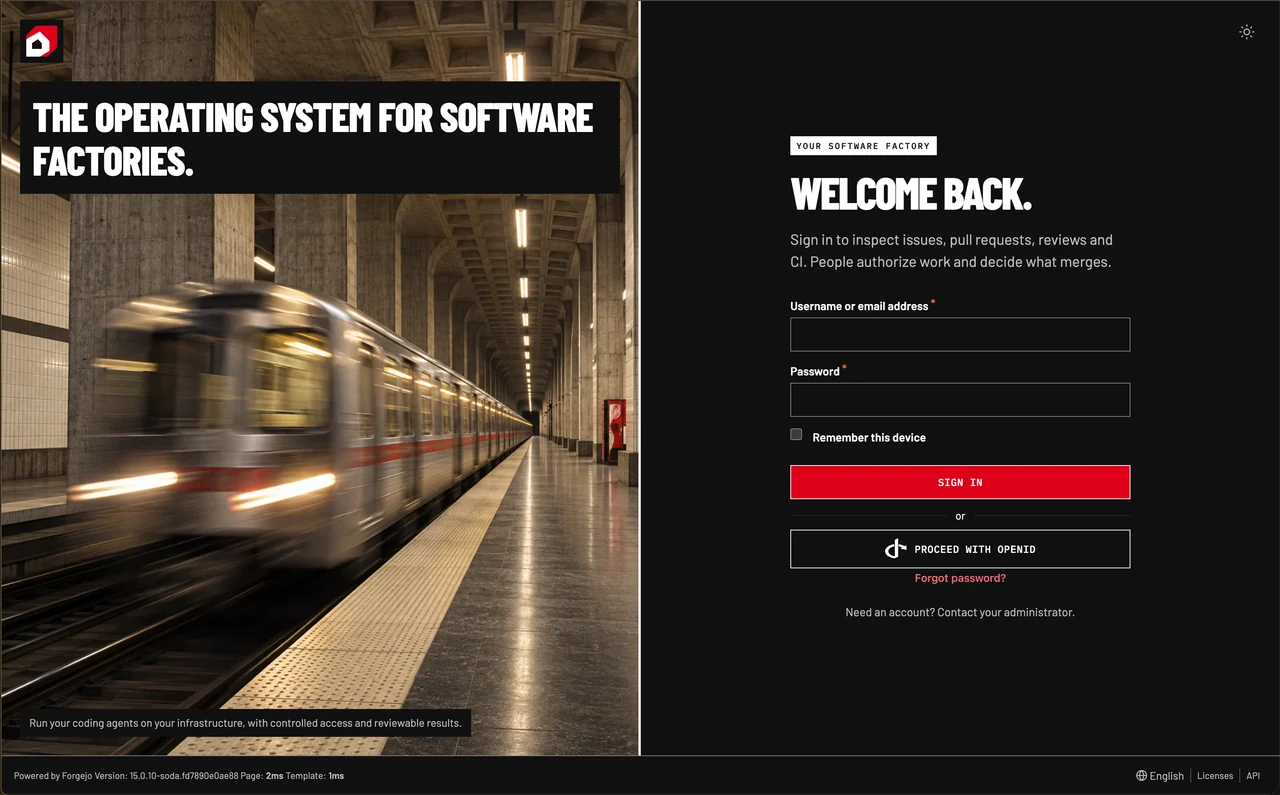
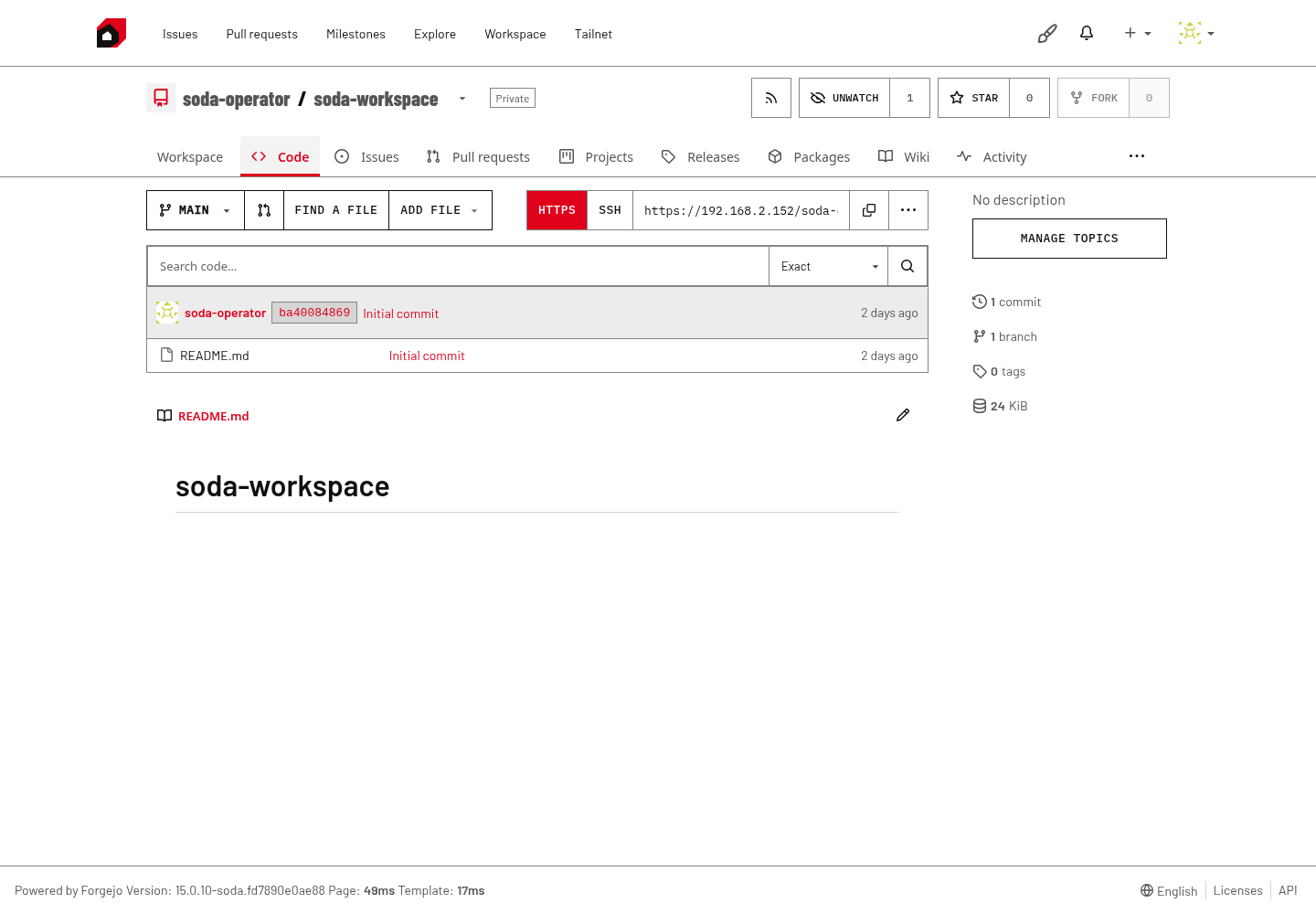
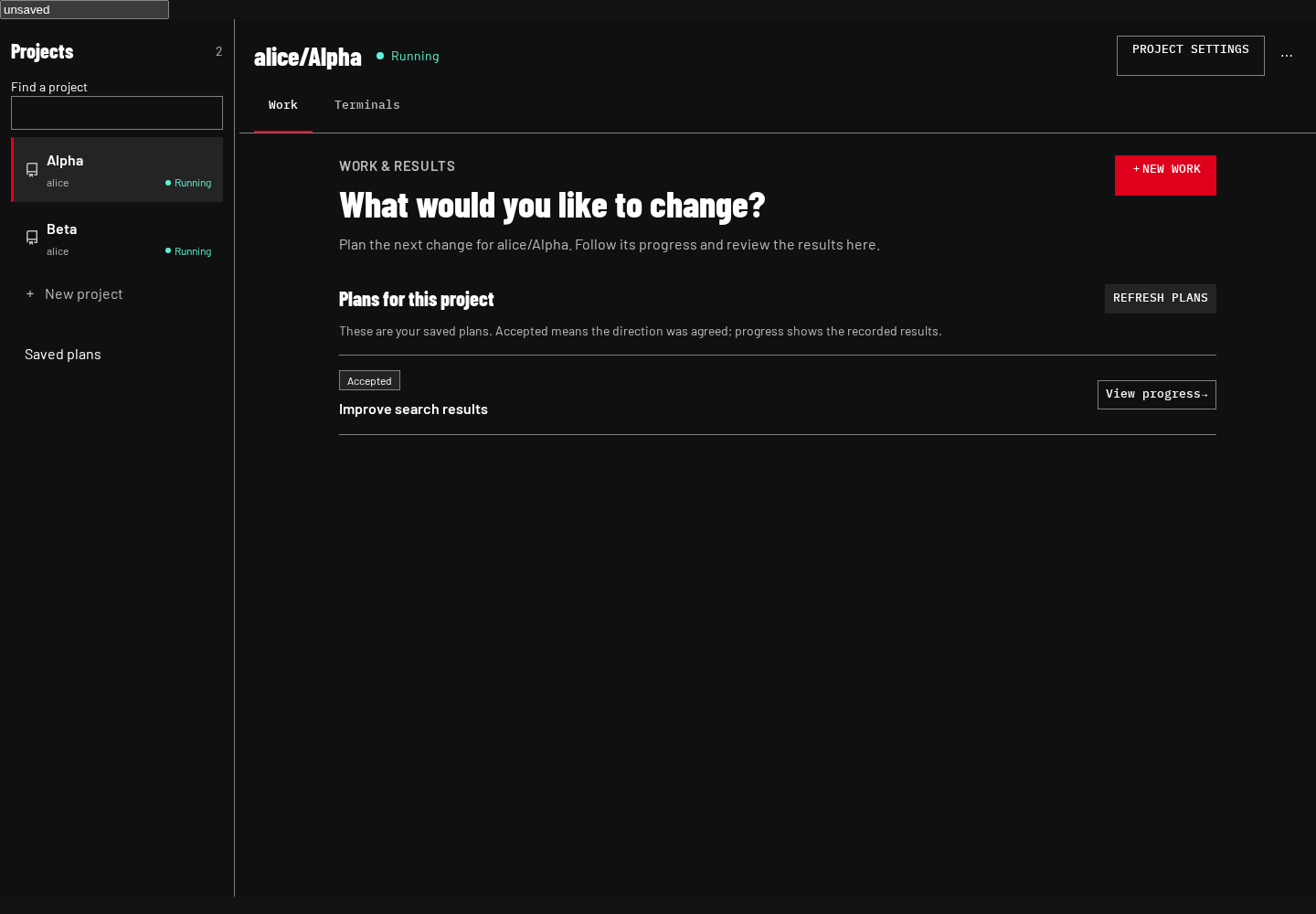
Swipe or scroll to explore. Open any screenshot at full size.
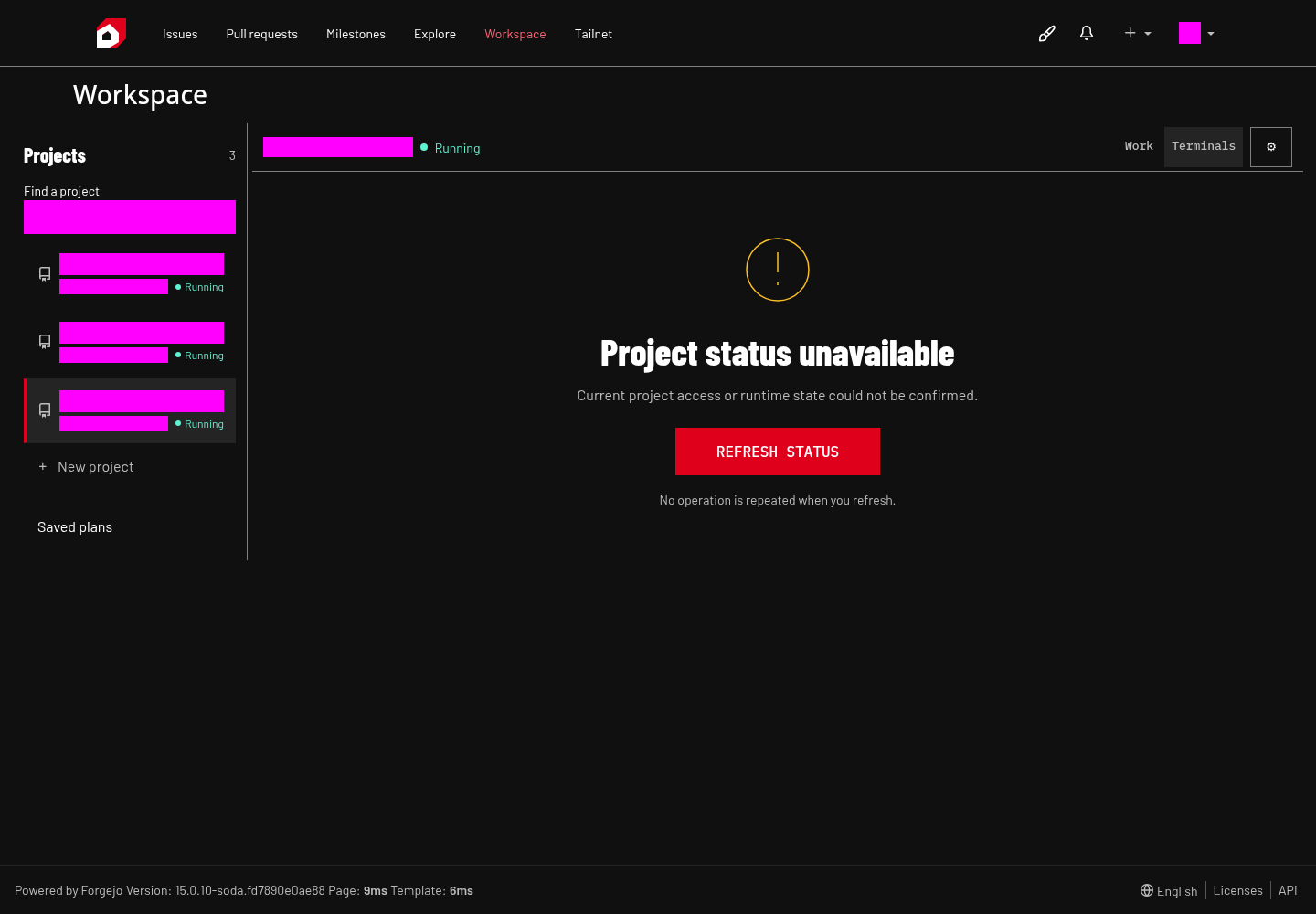
The terminal view offers a recovery action when project status cannot be confirmed. Project identifiers are masked in this verification capture.
Illustrative hardware
Direct install · Linux VM
Direct install · Linux VM
Gaming PC or workstation
Use the installer ISO on a compatible x86_64 PC or in an x86_64 virtual machine on a compatible host. WSL2 support for x86-64 Windows gaming PCs is planned for a future release.
Illustrative hardware
A computer of its own
A computer of its own
Dedicated hardware
Give a department’s factory a compatible x86_64 computer of its own, such as a mini PC. Keep its Projects available for continuing agent work and hands-on development.
Illustrative hardware
Virtual machine · Existing host
Virtual machine · Existing host
A compatible VM host
Boot the same installer ISO in an x86_64 virtual machine on a compatible host your team already controls.

















Any assigned task is visible to every employee. Match its owner to the signed-in staff member.