
The Soda OS platform

Your company’s software factory.

Build and keep improving internal tools on infrastructure your company operates. Departments define what the software must do. Soda OS coordinates AI development and review; IT manages access, capacity and operation.

Company-operated infrastructure, supported AI connections and a named technical operator.

  1. Agreed objective
    Business direction
    • Requirements
    • Acceptance criteria
  2. Repository change
    Development and review
    • Candidate + evidence
    • Independent review
  3. Repository policy
    Integrated changes
    • Required checks + approvals
    • Confirmed merge

Persistent Projects — a lasting workplace

Illustrative journey
01Company infrastructure · Hosting

Where it runs.

Choose a dedicated Linux host or install Soda OS itself. Compatible x86-64 gaming PCs, workstations, mini PCs, servers and virtual machines let you use infrastructure you already own.

Dedicated Linux host

Your dedicated Linux host
Soda runtimeProjects + nested containers

Illustrative hosting layers

Docker on a dedicated Linux host

Run the complete Soda application runtime, including Projects and nested containers. Your operator maintains Linux; the privileged runtime has administrative authority over its host.

Docker support in preparationRead the requirements

Hardware or virtual machine

Compatible hardware or VM
Soda OSFactory + Projects

Illustrative hosting layers

Soda OS on hardware or a VM

Install the operating system and factory on compatible x86-64 hardware or a compatible x86-64 virtual machine.

One released x86-64 ISO for both routesSee ISO installation

WSL2 support for x86-64 Windows gaming PCs is planned for a future release.

Managed Soda servers are planned after launch. At launch, your team deploys and operates its own Soda server.

The independently usable language has its own path: explore CanLang.

02Soda OS · Platform responsibilities

One platform, with clear responsibilities.

Keep business direction, repository collaboration and development connected.

Illustrative platform responsibilities

Peopledefine outcomes and accept the result

Soda Forge
Issues, code, pull requests and repository policy
Soda coordination
Authorized work, agents and execution evidence
Projects
Lasting environments with separate accounts and checkoutsHuman accountCoding accountReview account
Spaces
Progress, live activity and permitted controls.Shows coordination and Project activity
  • Soda Forge and Soda coordinationrecords and permitted actions
  • Soda coordination to Projectsexecutes work

Responsibilities, not execution order.

CanLang is an optional language for application source.

Company operators provide infrastructure, access and capacity.

03Soda OS · Reviewed development

From business direction to reviewed changes.

Soda turns accepted direction into ready work, then coordinates investigation, implementation, independent review and correction.

Illustrative factory process

From direction to delivery

  1. People · direction

    Stage 01: Agree on direction

    People define outcomes and resolve questions.

  2. Authority · prerequisites

    Stage 02: Prepare ready work

    Check prerequisites, access and the Project.

  3. Coding role · execution

    Stage 03: Investigate and plan

    Inspect the repository and plan implementation.

  4. Coding role · execution

    Stage 04: Build a candidate

    Agents implement and report a candidate with evidence. Soda publishes the pull request.

  5. Independent reviewer

    Stage 05: Review independently

    Another agent session reports findings.

  6. Coding role · correction

    Stage 06: Correct and verify

    The coding role fixes findings; checks run again.

  7. Repository policy · integration

    Stage 07: Integrate under policy

    Required evidence and repository rules govern merge.

  8. Coordination · next work

    Stage 08: Reassess remaining work

    Continue ready work or revise the plan.

Direction, execution, independent review and policy-governed integration.

Questions or limits can pause progress. Merging code and deploying an app are separate actions.

Read the factory walkthrough
04Soda Forge · Shared record

Keep the work connected to the code.

Issues, code, pull requests, discussions, reviews and checks share a repository home.

Illustrative repository trace

One repository home
DirectionIssueCandidatePull requestEvidenceReview + checksResultIntegration

Accepted direction, a candidate and its evidence stay connected to the result.

  • Define the work

    Capture outcomes and prerequisites in native issues.

  • Discuss and review

    Connect proposed changes, findings and checks.

  • Trace the result

    Link accepted direction, Soda’s execution records and integration.

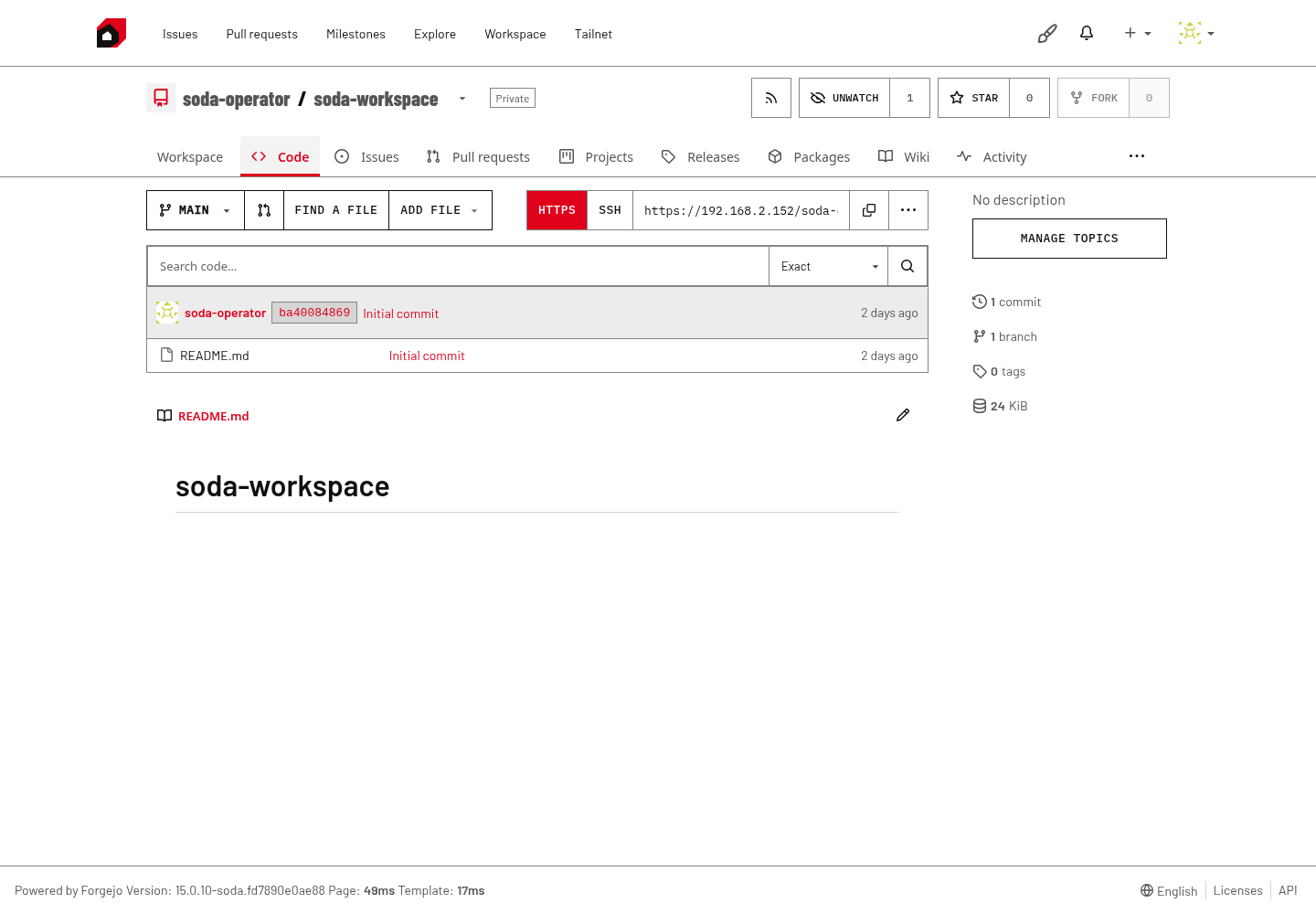
Soda Forge repository · Actual screenshot

Soda Forge repository page showing the main branch, an initial README commit, and navigation for issues, pull requests, releases and activity.

Source, commits and collaboration in Soda Forge. This capture shows a newly initialized repository with its first README commit.View full size

Built on Fountain, the maintained Forgejo fork.

Explore repository collaboration
05Spaces · Persistent Projects

A lasting workplace for your software.

A Project retains tools, files, accounts and services between requests. People, coding agents and reviewers use separate accounts and checkouts.

Illustrative Project continuity

Projects + Spaces
One persistent ProjectFiles · tools · accounts · service data
  1. First requestRun ends
  2. Next changeNew run
  3. Further improvementNew run
Same lasting development home
Separate executions. The Project and its durable work remain.

Separate runs share a lasting development home.

  • Keep the foundation

    Tools and service data remain when a run ends.

  • Follow work in Spaces

    See activity with its issue, candidate, findings and checks.

  • Intervene deliberately

    Clarify, pause or cancel. Take over in your own account after factory execution stops.

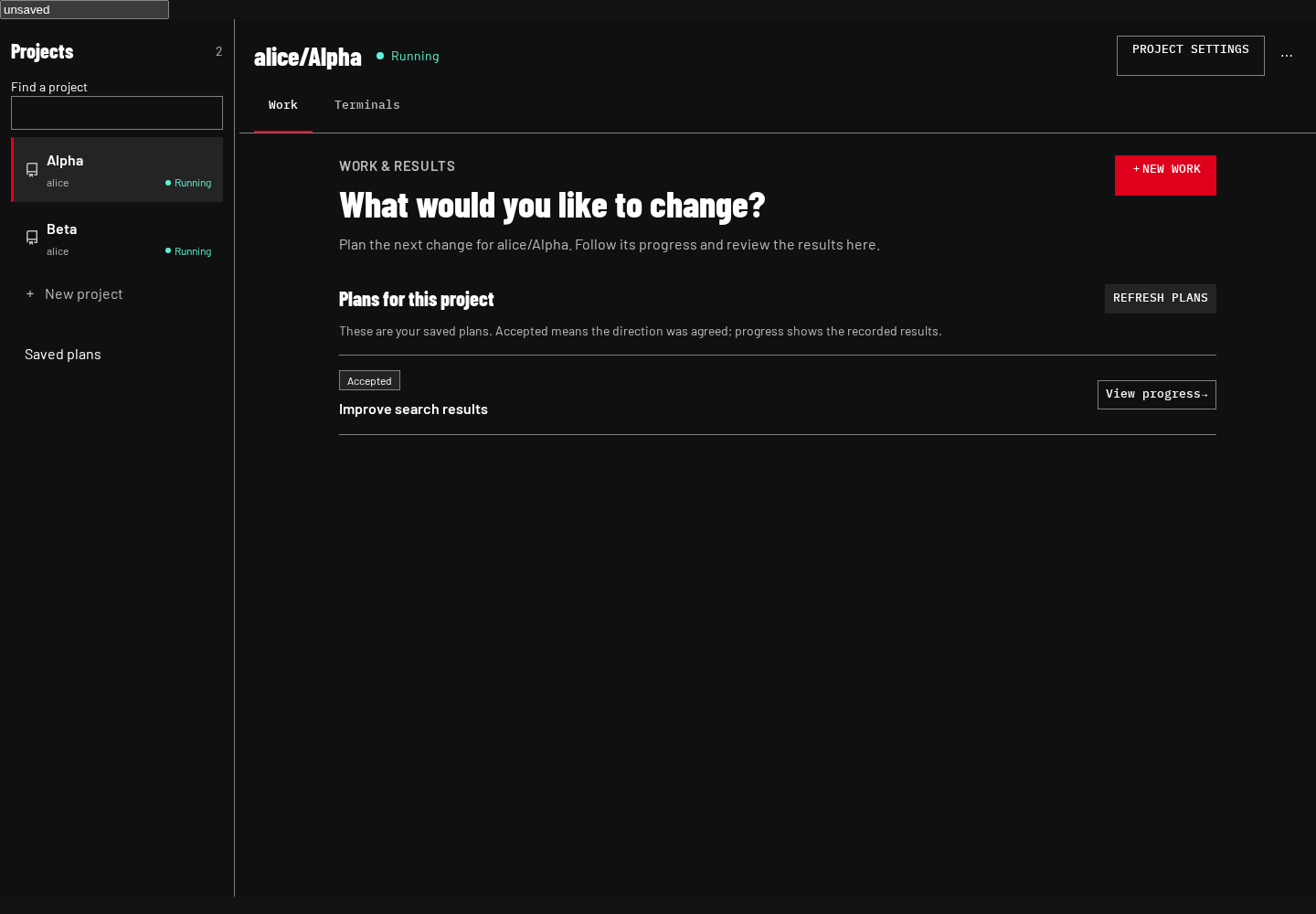
Spaces project work · Actual screenshot

Spaces Work view with Alpha and Beta sample projects, a saved Improve search results plan, and controls to start work or view progress.

Projects, saved plans and progress in the Work view. This interface capture uses sample projects and plan content.View full size

Closing a view does not cancel work. Stopping the Project stops sessions and services, while durable files remain.

Explore Projects and access
06Your repositories · Human development

Build on your code. Keep your tools.

Create a Soda Forge repository or import existing Git code. Keep hands-on development in your preferred editor and terminal.

Illustrative repository and Project

Choose a starting point

Create a repositoryORImport Git code
Native Soda Forge repository
associated environment

Persistent Project

  • Personal checkout
  • Coding checkout
  • Review checkout

Create or import a repository, then keep separate checkouts in its associated Project.

  • Bring Git history

    Verify the import and configure access and policy. Import is not automatic synchronization.

  • Join and develop

    Join project grants a personal account. Prepare your checkout, then use the browser terminal, SSH or your editor.

  • Manual development

    You can also clone from another Git host into your own checkout.

Factory work also requires accepted direction, a prepared Project and explicit authorizations.

07CanLang · Optional application language

Business foundations, built into the language.

Define the records, access and rules that fit your company. CanLang connects them to standard operations and interfaces.

Illustrative application foundations

One application source

RecordsAccessRulesInterfaces
Connected interfacesApplication model
Create viewRecord fieldsCreate a request
List viewRecords + statusActions follow the declared rules

One application source connects records, access, rules and interfaces.

  • Data that fits your work

    Typed records, relationships, validation and storage.

  • People and access

    Authentication, team context and explicit permissions.

  • Operations and workflows

    Standard record operations, business rules and guarded actions.

  • Connected interfaces

    Forms, tables, filters and actions using the same records.

Interface excerpt

Then
 page / title="Equipment requests"
  form Request.create
  list Request
   text row.item
   badge row.status
   action approve
The Request record, read permissions, create operation and approval rules are declared elsewhere.

For the remaining gaps, extend with $.

Generate saved, editable implementation during development.

CanLang works independently. Using it in Soda OS is optional.

08Company operation · Data and authority

Your infrastructure. Your operating rules.

Keep repositories and development environments on infrastructure your team operates. Select supported AI connections and set the rules for authorized work.

  • People and permissions

    Repository access, Project access and factory authorization.

  • AI access and capacity

    Supported accounts, agent profiles and execution allowances.

  • Review and integration

    Required checks, approvals and branch protections.

  • Operation and continuity

    Updates, backups, private access and recovery.

Illustrative company operation

Company-operated infrastructure

  • Department ownerUsers, business rules, exceptions and acceptance.
  • IT / platform operatorHost, private network, accounts, capacity and operating policy.
  • Repository maintainer / developerProject preparation, checks, technical intervention and application deployment. One person may hold several roles.
Business direction and acceptanceOperating policy and authority

Software factory

  • Soda Forge
  • Soda coordination
  • Account access
  • Projects and Spaces
Persistent ProjectsSeparate human, coding and review accounts and checkouts

Requests and supplied context leave the company boundary; responses return.

Outside company infrastructure

External AI services

  • Requests and supplied contextResponses return
    Coding AI providers
  • Requests and supplied contextResponses return
    TypeSafe / JEV
Reviewed changesExplicit application deployment decision

Application operation

Chosen application hostingApplication runtimeChosen hosting, which may share company infrastructure · application data · permitted users
  • Choose the application host
  • Name the operator
  • Set access and data responsibilities

Private applications, when the chosen deployment provides private access. A running development service or merged change does not establish production deployment.

Illustrative operating boundaries

Company responsibilities, external AI connections and application operation retain distinct boundaries.

What reaches external services? Requests and the context supplied to the selected service. Depending on the action and configuration, that can include repository content, task details and execution output. Review supported connection guidance before choosing accounts and permitted context.

Who authorises it? Your operator selects supported accounts and providers, permitted users, spending allowances and repository policy. Expired authentication or exhausted allowance interrupts work; Soda does not silently switch account, provider or billing method.

Self-hosting does not make every AI call local. The appliance serves a trusted team through private-network access. Shared-kernel containers do not establish hostile-tenant isolation; self-hosting alone establishes neither offline operation nor exclusive data residency.

Keep it useful day to day.

Resources and costs

Infrastructure
Hardware or VM cost, power, networking, compute capacity and persistent storage.
AI access
Applicable account or usage charges for supported coding services and TypeSafe / JEV. Conditions depend on the selected service.
Administration
Operator time, updates, backup storage and recovery preparation.
Resulting applications
Compute, storage, access and maintenance for the software you build, with an explicit operating owner.

Continuity

Access changes
Name who handles joiners, leavers, account access and policy changes.
Updates
Follow the update procedure and retain the information needed to resume work. Closing a page does not cancel a run; stopping a Project stops sessions and services while durable files remain.
Backups
Durable storage is not a backup. Know which repository data, Project data, configuration and account material the procedure protects, and where the copies live.
Recovery
Check restoration before depending on it. Application data and recovery follow the application's chosen hosting arrangement.

Departments own requirements and acceptance. IT operates the shared foundation.

09Your company · First workflow

Start with one useful workflow.

A department owner and technical operator can use this brief to agree a useful first result together.

Illustrative first-workflow brief

Department ownerWhat should the workflow do?

Users, rules, exceptions and a result to accept.

Technical operatorWhat will support it?

Host, accounts, authority, capacity and continuity.

One agreed first result

Department and operator agree one useful first result together.

  1. Choose the workflow and owner

    Start with equipment requests, onboarding, expenses, maintenance or a comparable process. Name its business owner, users, rules, exceptions and one result they can accept.

  2. Agree the operating foundation

    Choose a host route, supported AI connection, permitted test data, access and an initial resource allowance. Name who prepares the repository and Project, and who owns operation and recovery.

  3. Build, review and try

    Follow the reviewed changes into a running trial. Agree which permitted and refused actions the department will check, and retain the evidence.

  4. Accept and improve

    The department accepts the business result. Decide application hosting, access and maintenance separately, then return to the same Project for the next change.

Illustrative adoption milestones

  1. Accepted direction
  2. Reviewed code
  3. Running trial
  4. Business acceptance
  5. Deployment decision

Business acceptance and the application deployment decision are separate milestones.

Same workflow · Next rule€1,000

Above this amount: separate Finance approval

Earlier requests keep their workflow.

Keep improving the same workflow.

After equipment requests work for your team, add Finance approval above €1,000 while preserving earlier requests. The source, history and persistent Project give the next change a lasting home.

Use compatible x86-64 gaming PCs, workstations, mini PCs, servers or virtual machines. Your team operates the factory.

Already have Git code? Bring it with you.